Rhythm Shuffler: rhythm reading practice
Read a fresh rhythm, tap it back in time, and see how close every note was.
 Coming soon on theقريباً علىApp Store
One-time purchase. No subscription, no ads, no accounts.
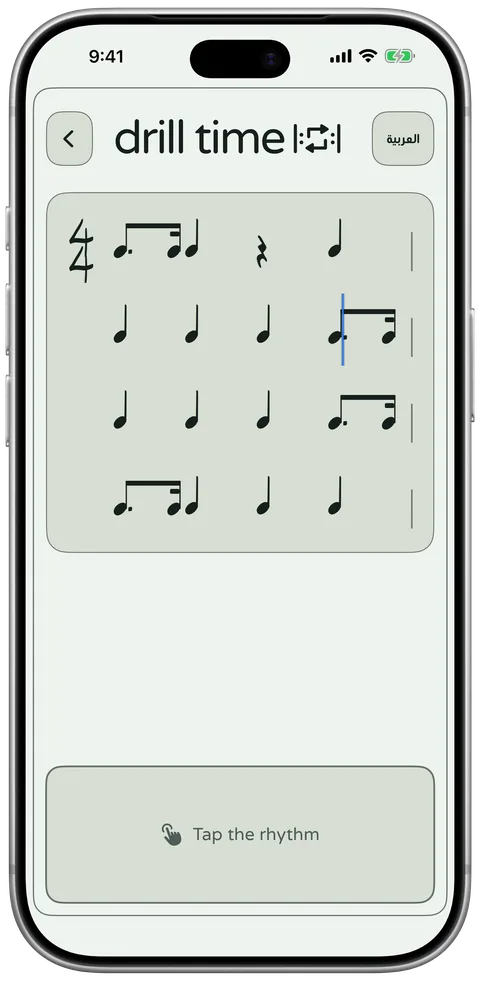

Read it, tap it, see how close you were
Read
A fresh rhythm appears in clear notation, in the time signature and number of bars you chose.
Tap
Tap the pad in time as a line moves through the bars.
See
Every note is marked on the beat, early, late or missed, with your accuracy as a percentage.
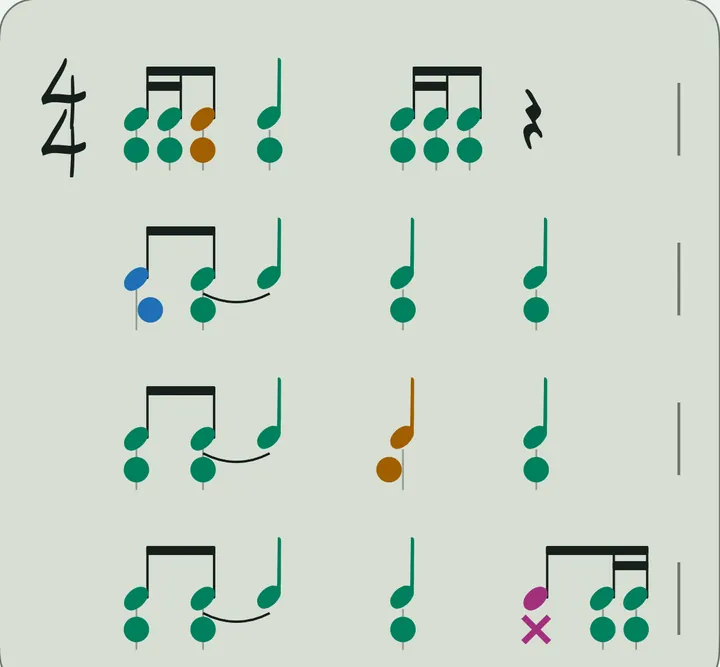
92% Accuracy
- 17On the beat
- 2Early
- 1Late
- 1Miss
From the four-bar rhythm shown.
See exactly where the timing slipped
Each note takes the colour of its timing, and a dot under it shifts towards the start or end of the bar to show how early or late you were. A miss shows a cross, and the colours are chosen to stay clear with colour blindness.
Tap any note to see how far off it was in milliseconds. If most of your taps were early or late, a short tip tells you which.
The first time you use a speaker or headphones, a quick 15-second calibration learns their timing, so your taps are judged fairly.
From Starter to Master
Six difficulty settings, each adding one new idea, so you can move on when the last one feels easy.
Starter
One rhythm, repeated, with a note on every beat.
Easy
A second rhythm joins in, along with your first rests.
Normal
Richer rhythms, with rests anywhere.
Hard
Your first syncopation: notes that start off the beat.
Expert
Adds semiquavers, triplets and ties.
Master
The widest mix of rhythms, arranged freely.
Fresh every time
Shuffle for a new rhythm whenever you like, so you practise reading rather than remembering.
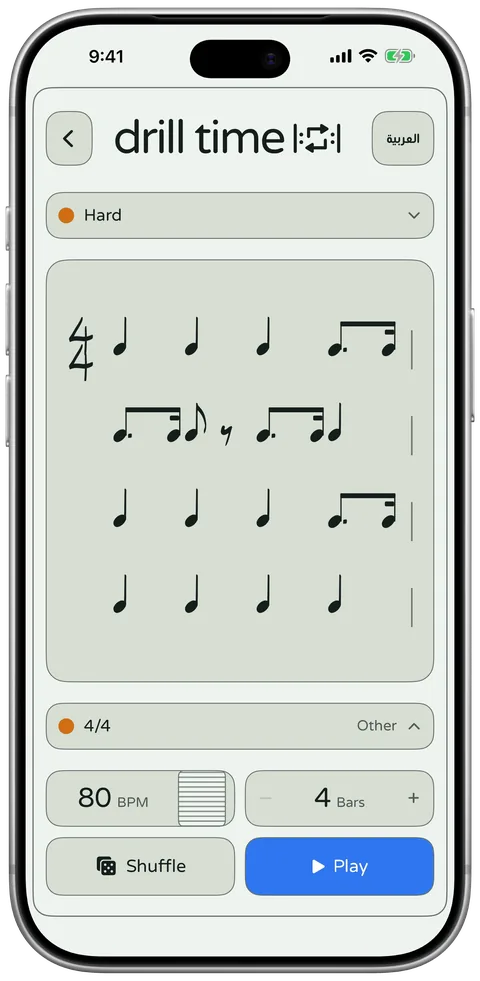
Pick from eight time signatures, including 3/4, 6/8 and 7/8, and tap one to hear its pulse first. Then set the tempo and show 4 to 8 bars at a time.
Reading rhythms with Rhythm Shuffler
How to use it, the habits I teach, common note values, key terms and common questions.
Who it helps
Reading rhythm is a separate skill from reading pitch, and it is the one my students most often skip. Rhythm Shuffler helps:
- Students who can count a rhythm but freeze when they see it written down.
- Beginners meeting quavers, rests and dotted notes for the first time.
- Students preparing for sight-reading in exams or ensemble rehearsals.
- Teachers who need new rhythms quickly, without writing them out by hand.
How to use it
Choose a difficulty, a time signature and a tempo, then shuffle to get a rhythm. Read it, tap it back on the screen in time, and check how accurate you were.
- Choose one of the six difficulty settings.
- Set the time signature, the tempo and the number of bars.
- Shuffle to get a new rhythm, then start it.
- Tap the rhythm on the screen as you read it.
- Check the result: your accuracy as a percentage and how many notes were on the beat, early, late or missed. Then try the same rhythm again or shuffle a new one.
Practice tips from a teacher
The rhythms can include dotted notes, rests and ties. These habits help my students read them:
- Count the beat out loud for a bar before you tap the first note.
- Look one beat ahead, not at the note you are tapping.
- Treat rests as part of the rhythm and keep counting through them.
- When a rhythm goes wrong, try it again before you shuffle a new one.
Common note values
The shape of a note shows how long it lasts, and these lengths are called note values (opens in a new tab). These are the ones you meet first:
| British name | US name | Beats in 4/4 |
|---|---|---|
| Semibreve | Whole note | 4 |
| Minim | Half note | 2 |
| Crotchet | Quarter note | 1 |
| Dotted crotchet | Dotted quarter note | 1½ |
| Quaver | Eighth note | ½ |
| Semiquaver | Sixteenth note | ¼ |
Key terms
- Rhythm
- The pattern of long and short sounds and silences in music, set against a steady beat.
- Syncopation
- Placing accents where you would not normally expect them, often off the beat, which gives the music a push.
- Tie
- A curved line joining two notes of the same pitch, so they sound as one note lasting for both values.
- Crotchet
- A note worth one beat in 4/4 time. In American English it is called a quarter note.
Questions
Do I need to read music to use Rhythm Shuffler?
You need to know the basic note values, such as crotchets and quavers. The easier settings use simpler rhythms, so it is a good way to learn the rest.
How does Rhythm Shuffler measure my timing?
When you finish tapping, it shows your accuracy as a percentage and how many notes were on the beat, early, late or missed, so you can see exactly where the timing slipped.
Will I see the same rhythms again?
The rhythms are fresh each time, so you practise reading rather than memorising one pattern.
Practise with DrillTime
Coming soon on theقريباً علىApp Store
One-time purchase. No subscription, no ads, no accounts.